Getting Your Credentials
The SDK needs two values to connect to your data:
- a User ID that looks like
u-xxxxxxx - a SAS token that starts with
sp=rl&st=
Both come from the IndieBI Partner Hub, and you can set everything up yourself: request access with one click, wait for the activation, then generate the token. The wait is the only slow part, and it takes up to 24 hours.
Check Your Status
Sign in to the IndieBI Partner Hub with your IndieBI account and open the Direct Data Access tab. The card at the top shows Your current DDA status, and the status tells you which step you're on:
| Status | What it means | Your next step |
|---|---|---|
| Not enabled | You haven't requested access yet | Request Access |
| Pending | We're activating your access | Wait for Activation |
| Enabled | Your access is ready | Generate the Token |
Request Access
With the status at Not enabled, click Request Access to DDA.

Wait for Activation
The status switches to Pending while we activate your access. This takes up to 24 hours. You don't need to keep the page open; come back later and check the status.

Generate the Token
Once the status reads Enabled, click Generate SAS Token. Two fields
appear below the button: Your User ID and Generated token. Copy
Credentials puts both values on your clipboard as ready-made .env lines.
Paste them into your workspace's .env file in place of its two placeholder
lines. If you're setting up with Claude, it opens that file for you and waits
while you paste.
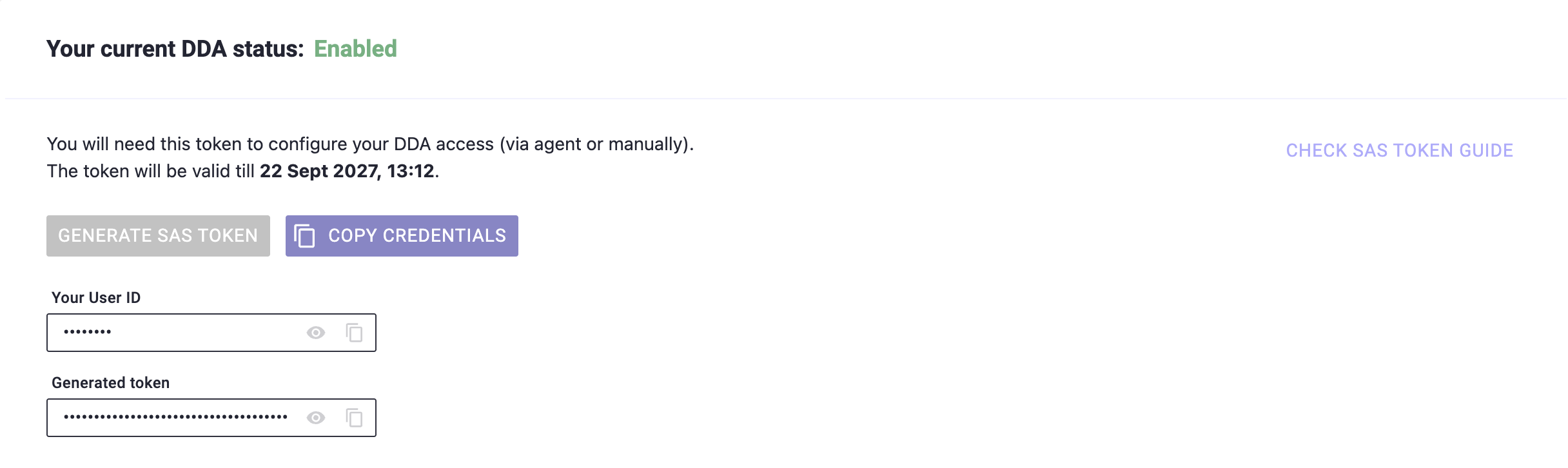
Copy both values before you leave the page. The setup pages ask for them
partway through, and they end up in the .env file in your workspace.
Your token expires after one year
A SAS token is valid for one year from the moment you generate it, and the
Partner Hub shows the expiry date right above the button. After that date
the SDK can no longer authenticate and queries stop working. The fix is
quick: open the Direct Data Access tab again, click Generate SAS Token,
then replace the two lines in your workspace's .env file with the ones
Copy Credentials gives you. If you work with Claude, it notices the
expired token the next time it fetches your data and opens .env for you
to paste the new lines into.
The token is scoped to your user and grants read-only access to your own data.
Treat it like a password all the same: keep it in .env and don't commit it or
paste it anywhere public.
Still Pending After a Day?
Activation normally completes within 24 hours. If the status hasn't moved to Enabled by then, or you can't sign in to the Partner Hub at all, reach out to your IndieBI contact and they'll sort it out.
Next Steps
With both values in hand, pick your setup route:
- Getting Started With Agents to have Claude set up the workspace and build your first dashboard
- Getting Started Manually to install and configure the workspace yourself